Phase 01.5: Design System Setup
Establish the HRMSElegance design system as the source of truth for all UI development
Phase 01.5: Design System Setup
Goal: Establish the complete design system foundation before any business entity UI development.
| Attribute | Value |
|---|---|
| Steps | 01-08 |
| Estimated Time | 6-8 hours |
| Dependencies | Phase 01 complete (auth working, can access protected pages) |
| Completion Gate | Design system docs exist, config files ready to copy, all essential components documented, AI rules in place |
Phase Context (READ FIRST)
What This Phase Accomplishes
- Complete design system documentation at
/docs/18-design-system/ - Configuration file specifications (globals.css, tailwind.config.ts, components.json)
- 18 essential component patterns documented with code examples
- AI governance rules to prevent UI drift
- Validation checklists for implementation and code review
What This Phase Does NOT Include
- Actually implementing React components (that happens in Phase 02+)
- Building the component library as a package
- Creating Storybook documentation
- Visual regression testing setup
Why This Phase Exists
Without a documented design system established upfront:
- Every AI agent makes different UI decisions
- Developers create inconsistent patterns
- "Wireframe look" with plain white cards and gray borders
- Dark mode gets forgotten
- Design drift leads to chaos
This phase creates the source of truth before any business entity UI work begins.
Bluewoo Anti-Pattern Reminder
This phase intentionally has NO:
- Component library as separate npm package (inline in apps/web)
- Storybook setup (documentation in MDX is sufficient)
- Design tokens as separate TypeScript package (CSS variables only)
- Visual regression testing (not needed for MVP)
If the AI suggests adding any of these, REJECT and continue with the spec.
Target UI
These screenshots show what the final UI should look like. All patterns documented in this phase must produce results matching this aesthetic.
Profile Page (Desktop)
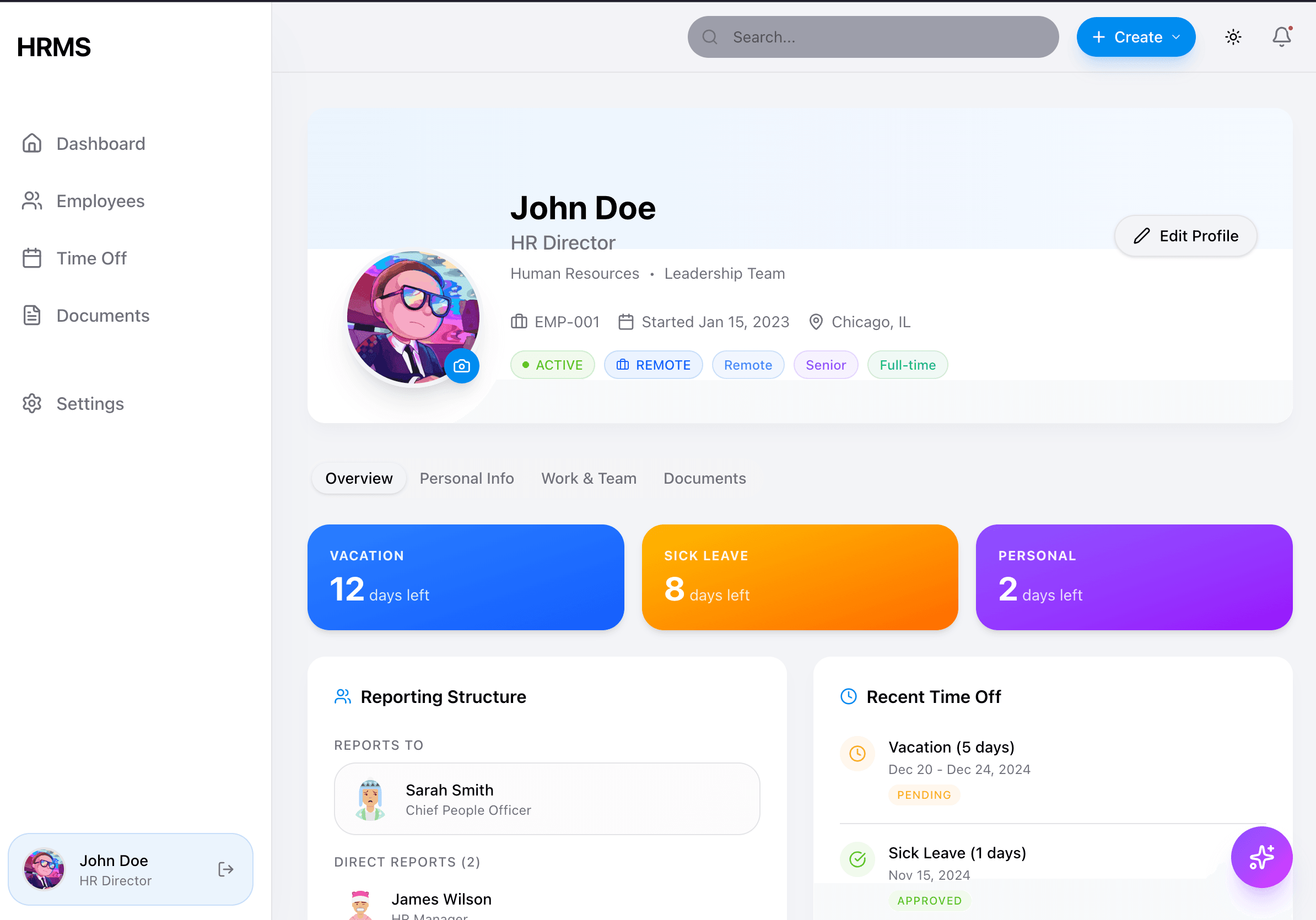
Key elements visible:
- Gradient balance cards (blue, orange, purple) with white text
- Tab navigation (Overview, Personal Info, Work & Team, Documents)
- White content cards with
shadow-lg(no borders) - Sidebar with blue active states
- Purple AI floating button in bottom-right
Settings Page
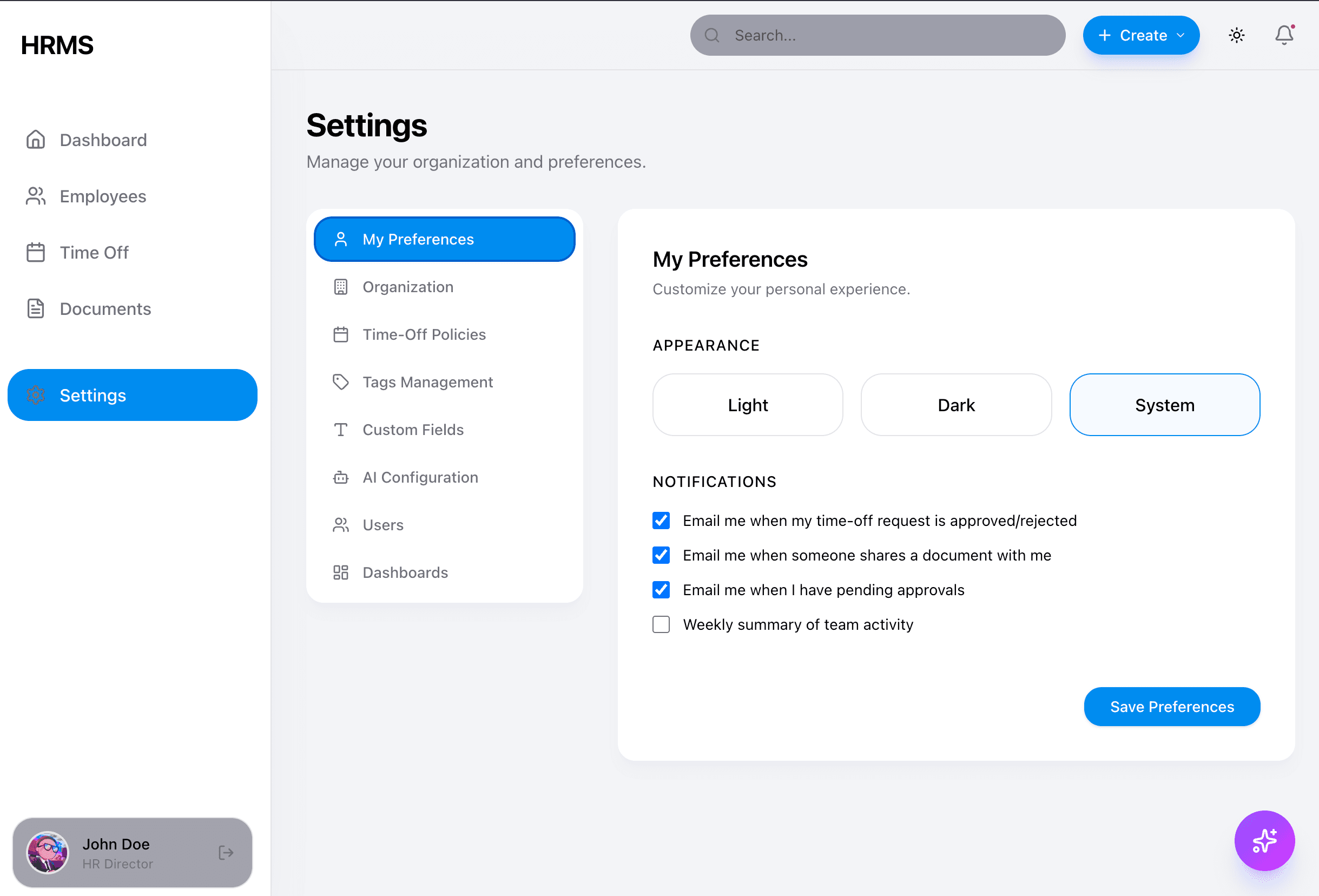
Key elements visible:
- Secondary sidebar navigation within the page
- Form inputs with rounded corners
- Blue primary action buttons
- Consistent card styling with shadows
Sidebar Navigation
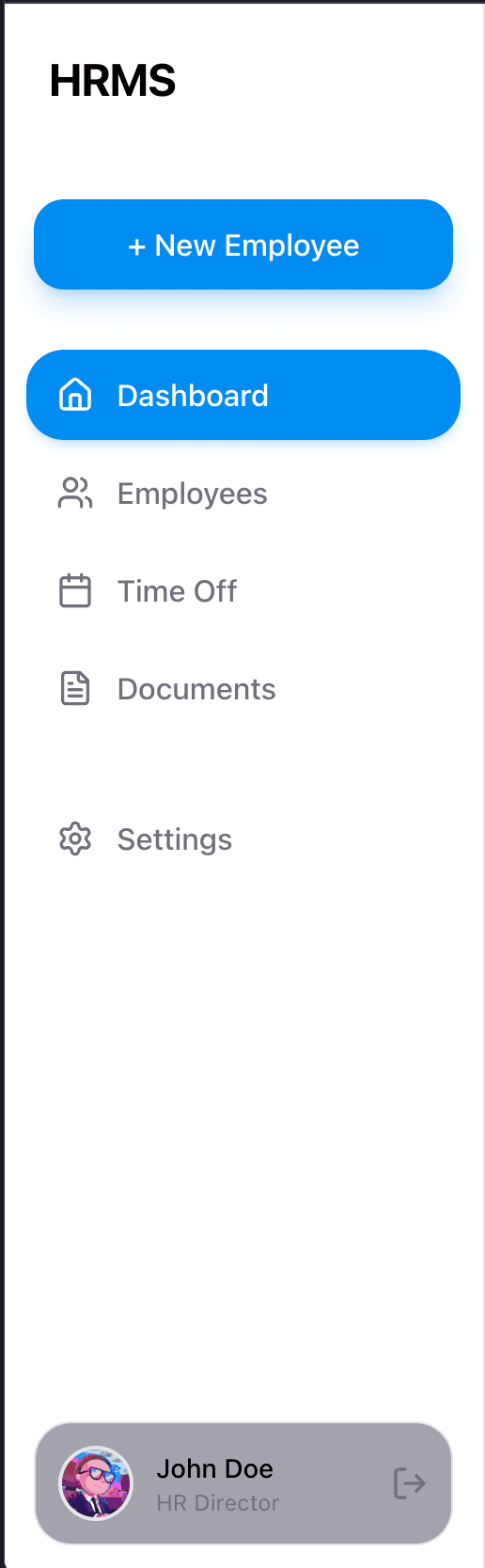
Key elements visible:
- Blue active state on current page
- Gray text for inactive items
- User profile with avatar at bottom
- Clean iconography from Lucide React
Additional Reference Screenshots
See the full visual reference gallery at Design System Overview for:
- Dashboard with gradient stats cards
- Employees table view
- Time Off page with balance cards
- Documents page with categories
- AI Assistant modal (collapsed and expanded)
- Mobile responsive layouts
Step 26: Verify Design System Documentation Structure
Input
- Phase 01 complete
- Design system docs exist at
/content/docs/18-design-system/
Constraints
- ONLY verify documentation exists
- DO NOT create new files (already done)
- DO NOT modify any code
Task
Verify these files exist:
content/docs/18-design-system/
├── index.mdx                    ✓ Overview
├── design-tokens.mdx            ✓ All color/spacing/shadow values
├── ai-rules.mdx                 ✓ AI governance rules
├── validation-checklist.mdx     ✓ Implementation checklists
├── config-files.mdx             ✓ Tailwind/CSS/shadcn specs
├── layouts.mdx                  ✓ Sidebar/TopBar/AppShell
└── components/
    └── index.mdx                ✓ Component catalog
Completion Gate
All files exist and contain substantive content.
Step 27: Create Component Pattern Documentation
Input
- Step 26 complete
- HRMSElegance prototype at
/prototype/HRMSElegance/
Constraints
- Read prototype components for reference
- Document patterns, not full implementations
- Include DO/DON'T examples
Task
Create component documentation files:
-
18-design-system/components/buttons.mdx- Button variants (default, secondary, destructive, outline, ghost)
- Button sizes (default, sm, lg, icon)
- Required classes and hover effects
- AI button pattern (gradient + glow)
-
18-design-system/components/cards.mdx- Stats card pattern (gradient + hover lift)
- Content card pattern (shadow, no border)
- DO NOT examples (plain white, gray borders)
-
18-design-system/components/forms.mdx- Input styling
- Select component
- Label + Field patterns
- Form layout
-
18-design-system/components/data-display.mdx- Table styling
- Badge variants
- Avatar component
-
18-design-system/components/feedback.mdx- Toast/Sonner patterns
- Skeleton loading
- Alert component
Completion Gate
All 5 component documentation files exist with code examples.
Step 28: Update AI Coding Agent Documentation
Input
- Step 27 complete
- AI rules documented at
/docs/18-design-system/ai-rules.mdx
Constraints
- Add UI-specific constraints
- Reference design system docs
- DO NOT duplicate content
Task
Update /docs/16-ai-coding-agents/development/constraints.mdx:
Add a new section for UI constraints:
## UI Development Constraints

All UI work MUST follow the [Design System](/docs/18-design-system):

### Mandatory Rules
1. **NEVER** create plain white cards with gray borders
2. **ALWAYS** use gradient backgrounds for stats cards
3. **ALWAYS** use `shadow-lg` on content cards
4. **ALWAYS** use `rounded-2xl` (16px) on cards
5. **ALWAYS** use CSS variables (`bg-card`, not `bg-white`)
6. **ALWAYS** support dark mode

### Before Writing UI Code
- Read [Design Tokens](/docs/18-design-system/design-tokens)
- Read [AI Rules](/docs/18-design-system/ai-rules)
- Check [Validation Checklist](/docs/18-design-system/validation-checklist)

### Code Review
Reject PRs that violate design system rules. See validation checklist.
Completion Gate
AI agent docs reference design system, constraints updated.
Step 29: Create ui-patterns.mdx for AI Agents
Input
- Step 28 complete
Constraints
- Machine-readable format
- Quick reference with code snippets
- Link to full documentation
Task
Create /docs/16-ai-coding-agents/development/ui-patterns.mdx:
Include:
- Quick reference table of required patterns
- Stats card code template
- Content card code template
- Button code template
- DO NOT examples with explanations
- Dark mode checklist
See existing ai-rules.mdx for content to summarize.
Completion Gate
New file exists with actionable patterns.
Step 30: Update Feature Phases Document
Input
- Step 29 complete
Constraints
- Add design system to CORE features
- Brief description only
Task
Update /docs/15-implementation-plan/feature-phases.mdx:
Add to CORE features:
### Phase 01.5: Design System Setup
- **Goal:** Establish UI foundation before business entity development
- **Deliverables:**
  - Design system documentation
  - Configuration file specifications
  - Component patterns
  - AI governance rules
Completion Gate
Design system appears in feature phases.
Step 32: Verify Configuration File Specs
Input
- Step 31 complete
- Config specs at
/docs/18-design-system/config-files.mdx
Constraints
- Verify all configs are complete
- Verify CSS variables match prototype
- DO NOT modify prototype
Task
Verify the following are documented and ready to copy:
-
globals.css
- All CSS variables from prototype
- Light and dark mode values
- Base layer styles
-
tailwind.config.ts
- Color theme extension
- Border radius values
- Animation keyframes
-
components.json
- shadcn/ui configuration
- Path aliases
-
lib/utils.ts
- cn() function
-
Dependencies list
- All required npm packages
Completion Gate
All config files documented with complete, copy-paste ready content.
Step 33: Final Validation
Input
- Steps 26-32 complete
Constraints
- Read-only verification
- Check all documentation
- Ensure no broken links
Task
Run through this checklist:
Documentation exists:
-
/docs/18-design-system/index.mdx -
/docs/18-design-system/design-tokens.mdx -
/docs/18-design-system/ai-rules.mdx -
/docs/18-design-system/validation-checklist.mdx -
/docs/18-design-system/config-files.mdx -
/docs/18-design-system/layouts.mdx -
/docs/18-design-system/components/index.mdx -
/docs/18-design-system/components/buttons.mdx -
/docs/18-design-system/components/cards.mdx -
/docs/18-design-system/components/forms.mdx -
/docs/18-design-system/components/data-display.mdx -
/docs/18-design-system/components/feedback.mdx
Content complete:
- Primary color is
#008CF0 - Sidebar is theme-aware (light/dark)
- AI button gradient is violet→purple→fuchsia
- Stats cards use gradient backgrounds
- Content cards use shadow (not border)
- Dark mode values documented
- All config files are copy-paste ready
Integration complete:
- AI agent docs reference design system
- Roadmap includes Phase 01.5
- Phase 02 depends on Phase 01.5
Completion Gate
Phase 01.5 complete. Ready for Phase 02: Employee Entity.
Quick Reference
Color Values
| Token | Light | Dark |
|---|---|---|
| Background | #F2F2F7 | #000000 |
| Card | #FFFFFF | #1C1C1E |
| Primary | #008CF0 | #008CF0 |
| Text | #000000 | #FAFAFA |
Essential Patterns
Stats Card:
className="bg-gradient-to-br from-blue-500 to-blue-600 rounded-2xl p-6 text-white shadow-lg hover:shadow-xl hover:-translate-y-1 duration-300"Content Card:
className="bg-card rounded-2xl p-6 shadow-lg shadow-gray-200/50 dark:shadow-black/40"AI Button:
className="bg-gradient-to-br from-violet-500 via-purple-500 to-fuchsia-500 rounded-full shadow-xl shadow-violet-500/30"Phase Completion Checklist (MANDATORY)
BEFORE MOVING TO NEXT PHASE
Complete ALL items before proceeding. Do NOT skip any step.
1. Gate Verification
- All design tokens documented and working
- shadcn/ui components installed and themed
- Dark mode switching functional
- Design system docs complete
2. Update PROJECT_STATE.md
- Mark Phase 01.5 as COMPLETED with timestamp
- Update "Current Phase" to Phase 02
- Add session log entry
3. Update WHAT_EXISTS.md
## Frontend Routes
- Design system configuration files

## Established Patterns
- Stats card gradient pattern
- Content card shadow pattern
- AI button gradient pattern
4. Git Tag & Commit
git add PROJECT_STATE.md WHAT_EXISTS.md
git commit -m "chore: complete Phase 01.5 - Design System"
git tag phase-01.5-design-system
Next Phase
After completing Phase 01.5, proceed to Phase 02: Employee Entity.
Phase 02 will use the design system patterns established here to build the Employee CRUD UI.