AI Builder Prompt
Ready-to-use prompt for Lovable, Replit, v0, and AI app builders
HRMS AI Builder Prompt
This page contains a ready-to-copy prompt for building the HRMS application using AI-powered platforms like Lovable, Replit, v0, or similar tools.
How to Use
- Copy the entire prompt below (use the copy button)
- Paste it into your AI builder platform
- Attach the Design Guide (
prototype-guide.mdx) for detailed specifications - Let the AI generate the application
- Follow up with specific refinements as needed
For detailed component specifications, see the Design Guide.
Visual Reference Images
Before generating any UI, study these screenshots. The generated UI must match this aesthetic:
Key Screenshots
| Screen | Image | Key Elements |
|---|---|---|
| Profile (Desktop) | 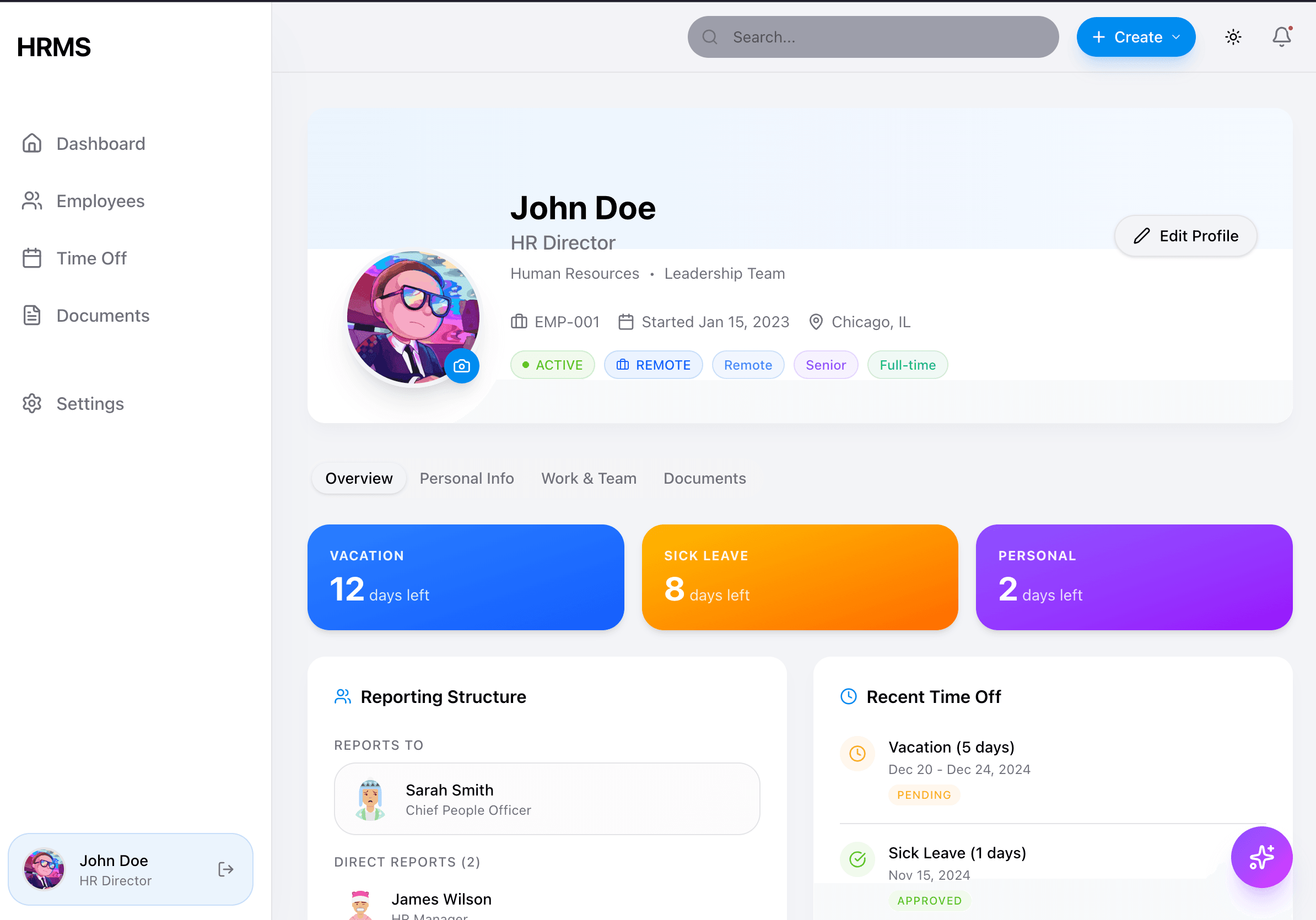 | Gradient balance cards, tab navigation, white content cards with shadows |
| Settings | 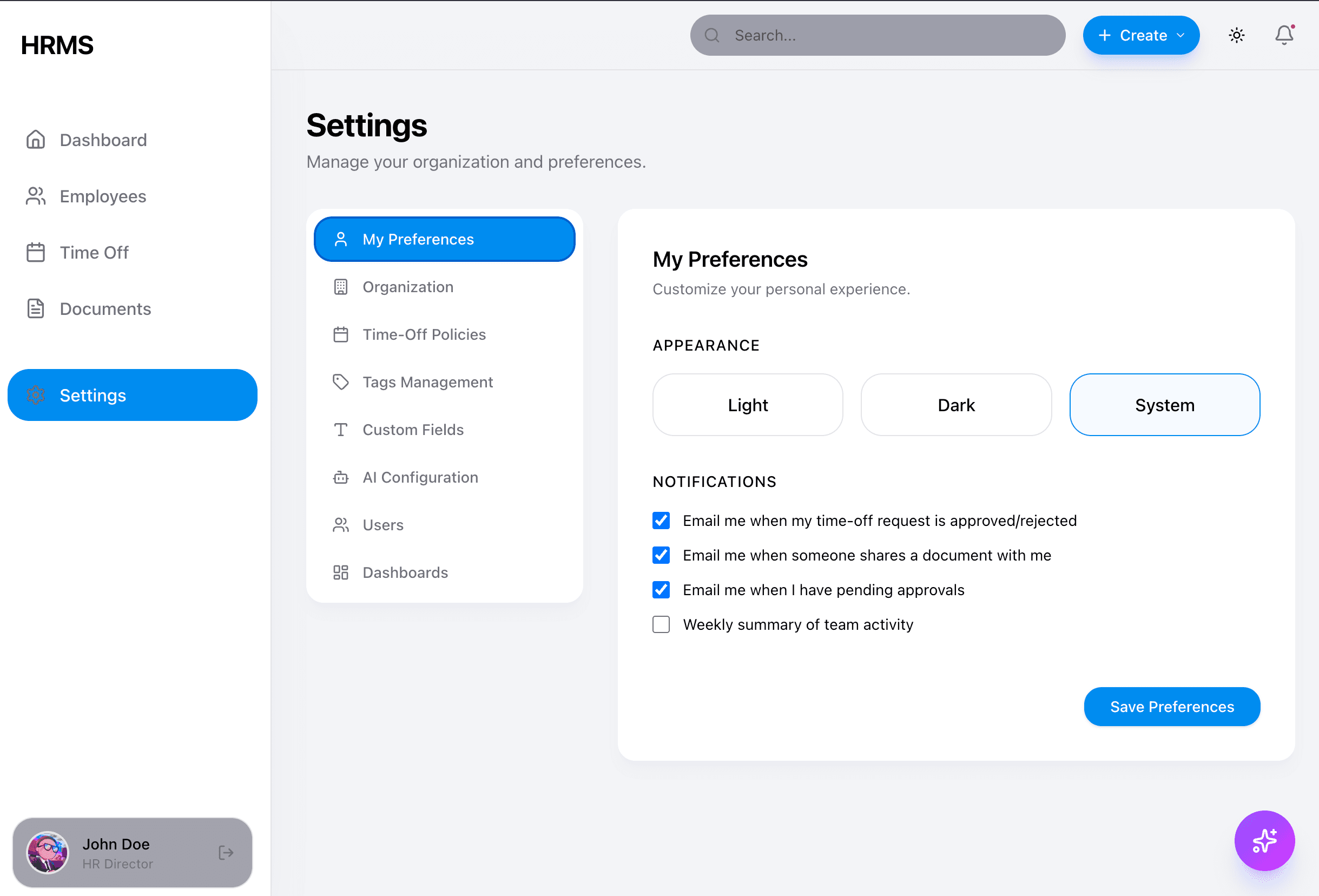 | Secondary sidebar, form layouts, blue primary buttons |
| Sidebar | 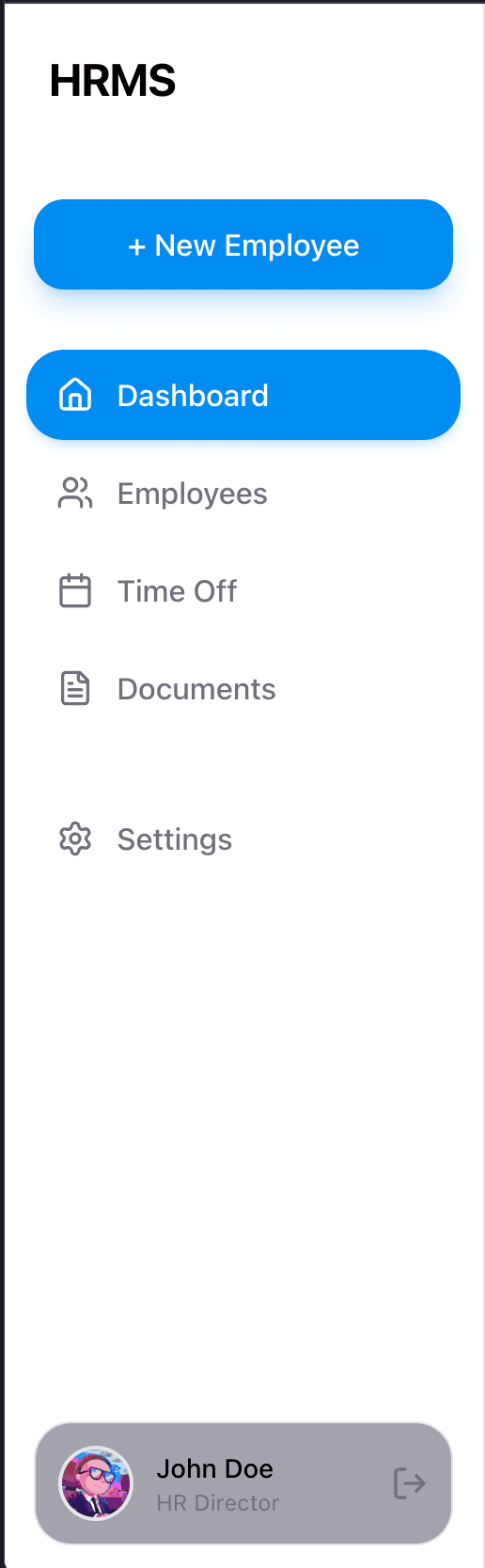 | Blue active state, user profile at bottom, clean icons |
What to Look For
When reviewing these reference images, pay attention to:
- Color Usage: Stats cards use gradient backgrounds (blue, orange, purple), NOT plain white
- Shadows: Content cards use
shadow-lgwithout borders - Corners: All cards use
rounded-2xl(16px radius) - Spacing: Generous padding (
p-6) inside cards - Sidebar: Blue active states, gray inactive text
- AI Button: Violet gradient floating button in bottom-right
Additional Screenshots Needed
See the full gallery at Design System Overview including:
- Dashboard with widget grid
- Employees table view
- Time Off with balance progress bars
- Documents page with categories
- AI Assistant modal states
The Prompt
Copy everything below this line:
Build a **polished, production-ready HRMS** based on the **HRMSElegance prototype** design system. This should look like a SHIPPED product, not a wireframe.

## Design DNA (CRITICAL - Read First!)

This design follows the **HRMSElegance prototype** aesthetic:
- **Background**: Apple-style `#F2F2F7` (gray-100) with white cards
- **Sidebar**: Theme-aware (white in light mode, dark gray in dark mode)
- **Stats Cards**: COLORFUL gradients with white text and hover lift effects
- **Content Cards**: White with soft shadows + dark mode variant, no borders
- **Buttons**: Primary blue (#008CF0), pill-shaped with scale effects
- **AI Button**: Violet→Purple→Fuchsia gradient with glow effect
- **Whitespace**: Generous spacing throughout
- **Typography**: System font with label hierarchy
- **Transitions**: Spring-based animations with Framer Motion

**DO NOT create a wireframe with plain white cards and gray borders. Use COLOR strategically.**

## Tech Stack (Required)

- React 19.x with TypeScript
- Tailwind CSS 3.4
- shadcn/ui components
- React Router v6
- Framer Motion for animations
- Lucide React for icons
- Recharts for charts
- date-fns for dates

## Color System (HRMSElegance Prototype)

Both **exact hex values** and **Tailwind class equivalents** are provided.

```typescript
const colors = {
  // Primary Colors (HSL → Hex → Tailwind)
  primary: {
    main: '#008CF0',               // HSL: 205 100% 47.1% | Tailwind: blue-500
    foreground: '#FFFFFF',         // White
  },

  // Secondary Colors
  secondary: {
    main: '#383B53',               // HSL: 233 19.4% 27.3% | Tailwind: slate-700
    foreground: '#FFFFFF',         // White
  },

  // Background Colors
  background: {
    primary: '#F2F2F7',            // HSL: 240 14% 96% | Tailwind: gray-100 - Main app bg
    card: '#FFFFFF',               // White | Tailwind: white - Cards, modals
    muted: '#F4F4F5',              // HSL: 240 5% 96% | Tailwind: gray-100
  },

  // Label/Text Colors
  label: {
    primary: '#000000',            // Tailwind: gray-900 - Titles, headlines
    secondary: '#8E8E93',          // HSL: 240 4% 46% | Tailwind: gray-500 - Captions
    muted: '#8E8E93',              // Tailwind: gray-500 - Muted foreground
  },

  // Status/Functional Colors
  status: {
    success: '#52C41A',            // HSL: 96 74.6% 43.5% | Tailwind: green-500
    warning: '#FAAD14',            // HSL: 40 95.8% 52.9% | Tailwind: amber-500
    error: '#FF4D4F',              // HSL: 359 100% 65.1% | Tailwind: red-500
  },

  // Sidebar Colors (Theme-aware)
  sidebar: {
    light: {
      bg: '#FFFFFF',               // White - bg-card
      active: '#008CF0',           // Primary blue - bg-primary
      hover: '#383B53',            // Secondary - bg-secondary
      text: '#000000',             // text-card-foreground
      textMuted: '#8E8E93',        // text-muted-foreground
    },
    dark: {
      bg: '#1C1C1E',               // iOS dark bg
      active: '#008CF0',           // Primary blue stays same
      hover: '#2C2C2E',            // iOS secondary dark
      text: '#FAFAFA',             // Off-white
      textMuted: '#A3A3A3',        // text-neutral-400
    },
  },

  // Stats Card Gradients
  statsGradients: {
    employees: 'from-blue-500 to-blue-600',          // Blue
    onLeave: 'from-amber-400 to-orange-500',         // Amber→Orange
    pending: 'from-violet-500 to-purple-600',        // Violet→Purple
    openPositions: 'from-emerald-400 to-green-500',  // Emerald→Green
    upcomingEvent: 'from-indigo-900 to-indigo-950',  // Indigo (dark)
  },

  // Content Cards
  card: {
    bg: 'white',
    shadowLight: 'shadow-lg shadow-gray-200/50',     // Light mode
    shadowDark: 'shadow-lg shadow-black/40',         // Dark mode
    radius: 'rounded-2xl',                           // 16px
  },

  // Buttons
  button: {
    primary: '#008CF0',            // bg-primary
    primaryShadow: 'shadow-lg shadow-primary/25',
    primaryHoverShadow: 'shadow-primary/35',
  },

  // AI Button (Violet→Purple→Fuchsia)
  ai: {
    gradient: 'from-violet-500 via-purple-500 to-fuchsia-500',
    shadow: 'shadow-xl shadow-violet-500/30',
    hoverShadow: 'shadow-2xl shadow-violet-500/40',
  },

  // Chart Colors
  charts: {
    chart1: '#008CF0',             // Blue
    chart2: '#52C41A',             // Green
    chart3: '#FAAD14',             // Amber
    chart4: '#FF4D4F',             // Red
    chart5: '#5CBDBD',             // Cyan/Teal
  },
};

// Animation System (Framer Motion + Tailwind)
const animations = {
  // Tailwind transition classes
  transitions: {
    default: 'transition-all duration-200',
    hover: 'transition-all duration-300',
    colors: 'transition-colors',
    transform: 'transition-transform',
    shadow: 'transition-shadow',
  },

  // Framer Motion spring configs
  spring: {
    default: { type: 'spring', damping: 25, stiffness: 300 },
    bouncy: { type: 'spring', damping: 15, stiffness: 400 },
  },

  // Framer Motion variants
  variants: {
    buttonEntrance: {
      initial: { scale: 0.8, opacity: 0 },
      animate: { scale: 1, opacity: 1 },
      exit: { scale: 0.8, opacity: 0 },
    },
    modalEntrance: {
      initial: { opacity: 0, y: 20, scale: 0.95 },
      animate: { opacity: 1, y: 0, scale: 1 },
      exit: { opacity: 0, y: 20, scale: 0.95 },
    },
    cardEntrance: {
      initial: { opacity: 0, scale: 0.8 },
      animate: { opacity: 1, scale: 1 },
    },
  },
};
Layout Architecture
Desktop (1024px+)
- LEFT SIDEBAR (Theme-aware: white/light in light mode, dark in dark mode):
- Width: 256px (w-64)
- Logo at top (h-16)
- Navigation items with active state (bg-primary with shadow)
- Inactive hover: bg-secondary
- User profile at bottom with border-t
- Shadow: shadow-2xl shadow-black/5
- TOPBAR (Sticky header):
- Height: 64px (h-16)
- Background: bg-background/80 with backdrop-blur-md
- Contains: Search, Quick Actions, Theme Toggle, Notifications
- CONTENT AREA on the right (bg-background = #F2F2F7)
- Floating AI button in bottom-right corner
Mobile (<768px)
- TopBar with hamburger menu (Sheet component)
- Content area (bg-background)
- Bottom navigation bar (5 items)
- Floating AI button above bottom nav
Component Styling
Stats Cards (COLORFUL with Hover Effects!)
// Total Employees - Blue gradient with hover lift
<div className="
  bg-gradient-to-br from-blue-500 to-blue-600
  rounded-2xl p-6 text-white shadow-lg
  transition-all hover:shadow-xl hover:-translate-y-1 duration-300
">
  <div className="flex items-center justify-between">
    <div>
      <p className="text-white/80 text-sm font-medium">Total Employees</p>
      <p className="text-4xl font-semibold tracking-tight">156</p>
    </div>
    <div className="w-12 h-12 bg-white/20 rounded-2xl flex items-center justify-center backdrop-blur-sm">
      <Users className="w-6 h-6 text-white" />
    </div>
  </div>
</div>

// On Leave - Amber→Orange gradient
<div className="bg-gradient-to-br from-amber-400 to-orange-500 rounded-2xl p-6 text-white shadow-lg
  transition-all hover:shadow-xl hover:-translate-y-1 duration-300">
  ...
</div>

// Pending Approvals - Violet→Purple gradient
<div className="bg-gradient-to-br from-violet-500 to-purple-600 rounded-2xl p-6 text-white shadow-lg
  transition-all hover:shadow-xl hover:-translate-y-1 duration-300">
  ...
</div>

// Open Positions - Emerald→Green gradient
<div className="bg-gradient-to-br from-emerald-400 to-green-500 rounded-2xl p-6 text-white shadow-lg
  transition-all hover:shadow-xl hover:-translate-y-1 duration-300">
  ...
</div>
Content Cards (White + Shadow with Dark Mode)
<div className="bg-card text-card-foreground rounded-2xl shadow-lg shadow-gray-200/50 dark:shadow-black/40 p-6 border-none">
  <h3 className="text-lg font-semibold">Recent Activity</h3>
  {/* content */}
</div>
Buttons (With Scale Effects)
// Primary - Blue with scale effect
<button className="
  bg-primary text-white
  px-3 py-2 rounded-full
  text-sm font-medium
  shadow-lg shadow-primary/25
  hover:shadow-primary/35 hover:scale-[1.02]
  transition-all active:scale-95
">
  Create
</button>

// Secondary - Dark gray
<button className="bg-secondary text-secondary-foreground border border-secondary-border font-medium px-6 py-2.5 rounded-full transition-all duration-200">
  Cancel
</button>

// Destructive - Red
<button className="bg-destructive text-destructive-foreground font-medium px-6 py-2.5 rounded-full transition-all duration-200">
  Delete
</button>

// Ghost - Transparent
<button className="border border-transparent hover:bg-secondary font-medium px-6 py-2.5 rounded-full transition-all duration-200">
  Ghost
</button>
AI Floating Button (Violet→Purple→Fuchsia)
<button className="
  fixed z-50
  bottom-6 right-6 md:bottom-8 md:right-8
  w-14 h-14 rounded-full
  bg-gradient-to-br from-violet-500 via-purple-500 to-fuchsia-500
  text-white
  shadow-xl shadow-violet-500/30
  hover:shadow-2xl hover:shadow-violet-500/40
  hover:scale-105 active:scale-95
  transition-all duration-200
  flex items-center justify-center
">
  <Sparkles className="w-6 h-6" />
</button>
Sidebar (Theme-Aware: Light/Dark)
<aside className="bg-card text-card-foreground w-64 border-r border-border shadow-2xl shadow-black/5 flex flex-col">
  {/* Logo */}
  <div className="h-16 flex items-center px-6">
    <span className="text-xl font-bold">HRMS</span>
  </div>

  {/* Navigation */}
  <nav className="flex-1 px-3">
    {/* Active nav item - blue with shadow */}
    <a className="flex items-center gap-3 px-3 py-2 rounded-lg bg-primary text-white shadow-md shadow-primary/20">
      <Home className="w-5 h-5" />
      <span>Dashboard</span>
    </a>

    {/* Inactive nav item */}
    <a className="flex items-center gap-3 px-3 py-2 rounded-lg text-muted-foreground hover:bg-secondary hover:text-foreground transition-colors">
      <Users className="w-5 h-5" />
      <span>Employees</span>
    </a>

    <a className="flex items-center gap-3 px-3 py-2 rounded-lg text-muted-foreground hover:bg-secondary hover:text-foreground transition-colors">
      <Calendar className="w-5 h-5" />
      <span>Time Off</span>
    </a>

    <a className="flex items-center gap-3 px-3 py-2 rounded-lg text-muted-foreground hover:bg-secondary hover:text-foreground transition-colors">
      <FileText className="w-5 h-5" />
      <span>Documents</span>
    </a>
  </nav>

  {/* User Profile at bottom */}
  <div className="p-4 border-t border-border">
    <div className="flex items-center gap-3 text-muted-foreground">
      <Avatar />
      <span className="text-sm">John Doe</span>
    </div>
  </div>
</aside>
TopBar (Sticky Header with Blur)
<header className="sticky top-0 z-20 w-full bg-background/80 backdrop-blur-md border-b border-border px-4 sm:px-6 h-16 flex items-center justify-between">
  {/* Left: Search */}
  <div className="relative">
    <Search className="absolute left-3 top-1/2 -translate-y-1/2 w-4 h-4 text-muted-foreground" />
    <input
      placeholder="Search..."
      className="pl-10 pr-4 py-2 bg-muted rounded-lg text-sm focus:outline-none focus:ring-2 focus:ring-primary/20"
    />
  </div>

  {/* Right: Actions */}
  <div className="flex items-center gap-3">
    <button className="bg-primary text-white px-3 py-2 rounded-full text-sm font-medium shadow-lg shadow-primary/25 hover:shadow-primary/35 hover:scale-[1.02] transition-all active:scale-95">
      Create
    </button>
    <ThemeToggle />
    <NotificationBell />
  </div>
</header>
Pages to Build
1. Dashboard
- Stats grid (4 colorful gradient cards in a row)
- Two-column layout below:
- Left: Pending Approvals (white card)
- Right: Recent Activity (white card)
- Optional: Department chart
2. Employees
- Search bar with filters
- Desktop: Clean table with hover states
- Mobile: Card view
- Status badges with color dots
3. Time Off
- Balance cards (can use gradients or white with colored accents)
- Request list
- Calendar view (optional)
4. Documents
- Grid of document cards
- Upload button
Visual Hierarchy Rules (HRMSElegance)
- Stats = Colorful gradients (blue, amber→orange, violet→purple, emerald→green)
- Content cards = White + shadow with dark mode variant
- Background = #F2F2F7 (gray-100) - Apple-style grouped content
- Sidebar = Theme-aware (white in light, dark gray in dark mode)
- AI button = Violet→Purple→Fuchsia gradient (floating call-to-action)
- Labels = Semantic colors (card-foreground, muted-foreground)
DO NOT (Common Mistakes)
❌ Plain white stats cards with gray borders ❌ Flat design without shadows ❌ Thin gray borders everywhere ❌ Small, muted icons ❌ Cramped spacing ❌ Wireframe/prototype aesthetic ❌ All-gray color scheme
DO (Required)
✅ Gradient backgrounds on stats cards ✅ Soft shadows on content cards (shadow-lg) ✅ Rounded corners (rounded-2xl = 16px) ✅ Bold, saturated accent colors ✅ Generous whitespace (p-6 minimum for cards) ✅ High contrast text (dark on white) ✅ Pill-shaped buttons (rounded-full)
Mock Data
const employees = [
  { id: '1', firstName: 'Sarah', lastName: 'Chen', jobTitle: 'Engineering Manager', department: 'Engineering', status: 'active', location: 'San Francisco', avatarUrl: 'https://api.dicebear.com/7.x/avataaars/svg?seed=Sarah' },
  { id: '2', firstName: 'Marcus', lastName: 'Johnson', jobTitle: 'Senior Developer', department: 'Engineering', status: 'active', location: 'San Francisco', avatarUrl: 'https://api.dicebear.com/7.x/avataaars/svg?seed=Marcus' },
  { id: '3', firstName: 'Emily', lastName: 'Rodriguez', jobTitle: 'Product Designer', department: 'Design', status: 'on_leave', location: 'New York', avatarUrl: 'https://api.dicebear.com/7.x/avataaars/svg?seed=Emily' },
  { id: '4', firstName: 'James', lastName: 'Wilson', jobTitle: 'HR Director', department: 'HR', status: 'active', location: 'Chicago', avatarUrl: 'https://api.dicebear.com/7.x/avataaars/svg?seed=James' },
  { id: '5', firstName: 'Lisa', lastName: 'Park', jobTitle: 'Marketing Lead', department: 'Marketing', status: 'active', location: 'Los Angeles', avatarUrl: 'https://api.dicebear.com/7.x/avataaars/svg?seed=Lisa' },
];

const stats = {
  totalEmployees: 156,
  onLeaveToday: 8,
  pendingApprovals: 12,
  openPositions: 5,
};
Build Order
- Phase 1: Sidebar + Layout shell
- Phase 2: Dashboard with colorful stats cards
- Phase 3: Employees page
- Phase 4: AI floating button + chat panel
- Phase 5: Time Off, Documents, Settings
Quality Checklist (HRMSElegance)
- Stats cards have gradient backgrounds with hover lift effect (hover:-translate-y-1)
- Stats card icons have backdrop-blur-sm on bg-white/20 container
- Content cards have shadow-lg shadow-gray-200/50 + dark:shadow-black/40
- Sidebar is theme-aware (bg-card, not always dark)
- Sidebar active state uses bg-primary with shadow-md shadow-primary/20
- Background uses bg-background (#F2F2F7)
- Primary buttons have hover:scale-[1.02] and active:scale-95
- AI button uses from-violet-500 via-purple-500 to-fuchsia-500
- AI button has shadow-violet-500/30 (not purple)
- TopBar has backdrop-blur-md
- Framer Motion animations for modals/dialogs
- Generous whitespace throughout (p-6 minimum for cards)
- Dark mode is fully supported
---

## Follow-Up Prompts

After the initial build, use these prompts for refinements:

### If Stats Cards Are Plain White
The stats cards should NOT be plain white. Change them to use gradient backgrounds:
- Total Employees: bg-gradient-to-br from-blue-500 to-blue-600 text-white
- On Leave: bg-gradient-to-br from-amber-400 to-orange-500 text-white
- Pending: bg-gradient-to-br from-violet-500 to-purple-600 text-white
- Open Positions: bg-gradient-to-br from-emerald-400 to-green-500 text-white
Each card should have:
- rounded-2xl, shadow-lg, p-6
- Icon container: bg-white/20 rounded-2xl backdrop-blur-sm
- Hover effect: hover:shadow-xl hover:-translate-y-1 duration-300
### If Cards Look FlatAdd depth to content cards:
- Use shadow-lg shadow-gray-200/50 for light mode
- Add dark:shadow-black/40 for dark mode
- Use rounded-2xl for larger border radius (16px)
- Remove all borders, rely on shadows only
- Add p-6 padding inside cards
### If Buttons Are BoringMake buttons with scale effects:
- Primary: bg-primary text-white rounded-full px-3 py-2 shadow-lg shadow-primary/25
- Add hover:shadow-primary/35 hover:scale-[1.02]
- Add active:scale-95 for press feedback
- Use font-medium for text weight
- Add transition-all for smooth effects
### Add Framer Motion Animations
```text
Add Framer Motion animations with spring physics:

// Button entrance
initial={{ scale: 0.8, opacity: 0 }}
animate={{ scale: 1, opacity: 1 }}
exit={{ scale: 0.8, opacity: 0 }}

// Modal/Dialog
initial={{ opacity: 0, y: 20, scale: 0.95 }}
animate={{ opacity: 1, y: 0, scale: 1 }}
exit={{ opacity: 0, y: 20, scale: 0.95 }}
transition={{ type: "spring", damping: 25, stiffness: 300 }}

// Stats cards stagger on load (50ms delay between cards)
// Support "prefers-reduced-motion" media query
Make Sidebar Theme-Aware
The sidebar should adapt to light/dark mode:
- Light mode: bg-card (white), text-card-foreground
- Dark mode: bg-card (#1C1C1E), text-card-foreground
- Active item: bg-primary text-white shadow-md shadow-primary/20
- Inactive hover: hover:bg-secondary hover:text-foreground
- Add border-r border-border and shadow-2xl shadow-black/5
Add TopBar with Blur
Add a sticky header with backdrop blur:
- Position: sticky top-0 z-20
- Background: bg-background/80 backdrop-blur-md
- Height: h-16
- Border: border-b border-border
- Include: Search bar, Create button, Theme toggle, Notifications